Welcome Back quitter!

Note: this only works in Google Chrome!
Step 1: (A new browser tab will open and log you in. Close that browser tab so you're back here)
Step 2: Edit welcome text and click green checkmark on bottom-left to save. Next, open a new browser and type in 'https://door.twincreekmedia.com/manager', manually log out of door manager (top left of the screen). Close that browser tab so you're back here, and refresh your page.
Step 3: (select Door Sign)
Step 4:
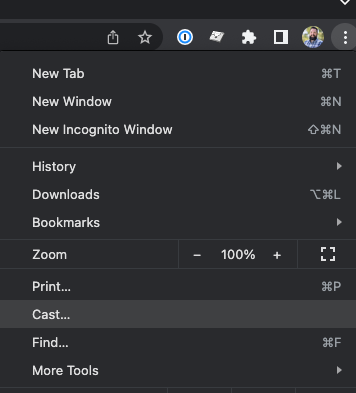
Step 5: To reset sign click the blue "Cast" button in the top-right of Chrome:
Click:  ,then:
Note: If you need to reset sign for someone else, click the three dots in the top right, then select cast. Afterwards follow Step 5 to stop casting and the sign will be reset.